


Debt Payoff Planner & Tracker
4.51.23K Reviews
App Specs
- Version
- 2.54
- Updated On
- License
- Free
- Downloads
- 500,000+
- Developer
- Easily get a plan and stick to it - OxbowSoft LLC
- Categories
- Finance
- Platform
- Android
Screenshots
 Analysis by AppCompare
For a household trying to get debt under control, the hardest part is often agreeing on what to do next, not finding another budget chart. I see Debt Payoff Planner & Tracker as a practical planning aid: it can help turn a collection of balances and due dates into a payoff approach people can discuss. Its value is clearest when everyone involved understands who is entering information and treats the plan as a shared reference, rather than assuming the app itself will coordinate a household.
Start with one person’s view of the numbers
Before adding debts, decide whose financial picture the plan represents. A couple might be tracking shared obligations, while one partner separately manages a personal card or loan. Keeping those boundaries clear matters: combining balances in one plan can make a household goal easier to see, but it can also blur responsibility if the people using it assume every debt belongs to everyone.
I would agree on a simple rule before entering anything: include only the accounts the plan is meant to cover, and make sure the person maintaining it is comfortable handling those details. If each partner wants a separate view, maintaining separate plans may be clearer than treating one set of totals as a complete picture of both people’s finances. That distinction also makes later progress checks more useful, because a changing total has an agreed meaning.
There is a useful trade-off here. A combined plan can help a household compare payoff priorities in one place, but it should not replace a conversation about individual obligations or who will make each payment. The planner helps organize a strategy; it does not decide household boundaries for you.
Use the plan to make a workable routine
Debt figures can change after a payment, a new statement, or an extra contribution. I’d treat the planner as a record to keep current, not as an automatic source of truth. When someone makes a payment, update the relevant information so the totals and payoff projections remain meaningful. If updates are delayed, a neat progress view can look more precise than the underlying entries really are.
A realistic routine might be to check the plan when a statement arrives, confirm the minimum due and balance, and then decide whether any extra money can go toward the chosen target. If one person enters the figures and another makes the payment, agree on when the update happens. This small handoff can prevent a common household mismatch: one person believes the plan reflects a recent payment while the other is still looking at the previous balance.
For irregular income, I would avoid building a plan around an optimistic extra-payment amount. Keep required payments distinct from occasional additions, and use a bonus or unusually light-expense month as a chance to revisit the target. That makes the strategy more resilient than assuming every month will offer the same spare cash.
Worth Reading Before You Choose

EA SPORTS FC Mobile 26 Is a Bigger Football Game, but It Takes Time

Flipboard Shows What News Apps Must Do Beyond the Feed

Switching to Android Auto Means Rethinking Your Driving Routine

Google Calendar Makes a Crowded Week Easier to Manage

Ludo King Makes the Most of the Minutes Between Plans

Baby Panda World Brings Quick Play to Modern Phones, but Its Game Library Feels Busy
Coordination without confusing the numbers
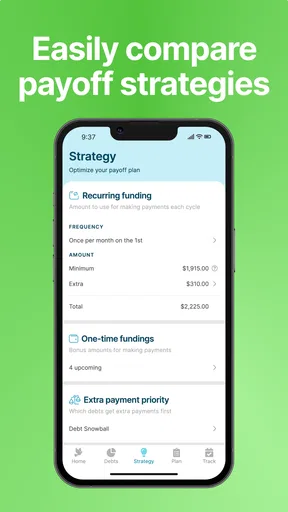
The avalanche and snowball approaches give household discussions a concrete starting point. With avalanche, the focus is the highest interest rate; with snowball, it is the smallest balance. If partners disagree, comparing both can shift the conversation from “which debt feels most urgent?” to a clearer choice between reducing interest costs and gaining an earlier payoff milestone.
That comparison still depends on accurate inputs and household priorities. A mathematically appealing order may not feel sustainable if one person needs an early win to stay engaged. On the other hand, choosing a small balance first can mean leaving a higher-rate balance for later. I’d use the simulations to understand that trade-off, then choose a plan both people can stick with rather than treating a projection as a command.
Payment reminders can support coordination, but a reminder is not the same as confirmation that a payment was made. If responsibility is shared, decide who checks the due date and who verifies that the payment has actually gone through. This is especially helpful when one person handles the plan and another handles banking; the app can support the routine, but the household still needs a clear handoff.
Privacy, age, and trust at home
Debt information is personal, even when a household is working toward a shared goal. I would not put sensitive financial details on a device that other people use casually unless the person responsible is comfortable with that arrangement. A shared phone or tablet can make a plan convenient to review together, but it can also make balances visible to people who are not part of the decision.
The app has an Everyone content rating, but that is an age-content classification, not a reason to treat debt planning as a children’s activity. Adults should decide what financial information younger household members need to know and explain the goal in an age-appropriate way without making them responsible for adult obligations. For a household conversation, a high-level progress update may be more appropriate than opening every account detail.
I also wouldn’t assume that a shared device creates separate account boundaries or household permissions. Keep access decisions deliberate, and avoid relying on the app as the place where family roles are enforced. If the household needs formal shared access controls, or a dedicated system for assigning and auditing responsibilities, a different financial tool may be a better fit.
Getting Started with Debt Payoff Planner & Tracker
First things first, downloading and setting up the Debt Payoff Planner & Tracker is a breeze. Available on both Android and iOS, you can grab it from the Google Play Store or the App Store with just a few taps. Once you open the app, you’re greeted with a clean and intuitive interface that’s not overwhelming, which is always a win in my book.
It’s a finance app from Easily get a plan and stick to it - OxbowSoft LLC, and it is free to download. The free starting point makes it easier to try the planning approach before deciding whether it suits your routine; in-app purchases run from around seven to forty-two dollars per item, so I would check what an optional purchase covers before buying. It is rated for Everyone, has an average rating of 4.5 from around 4,500 ratings, and has passed 500,000 installs. It first arrived on January 8, 2015, and version 2.54 requires Android 6.0 or later.
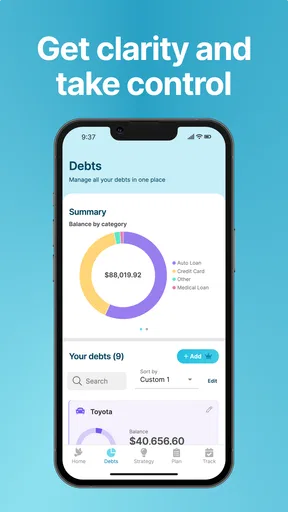
The app kicks off by asking you to input your debts. This includes the type of debt, amount, interest rate, and minimum payment. It’s pretty straightforward, and the app guides you through the process with helpful tips. I liked that it didn’t rush me; instead, it took its time to ensure I understood each step.
For a first setup, I’d gather recent statements before entering figures rather than relying on memory. An interest rate or minimum payment copied from an old bill can skew the comparisons, and that can make a projected payoff order less useful. If you have several balances, entering them in one sitting may feel tedious; doing it in a few focused passes is better than guessing simply to finish quickly.
Navigating the Features
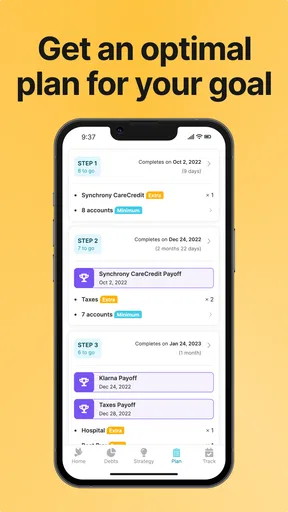
Once you’ve inputted your debts, the real magic begins. The app offers a few different payoff strategies, such as the avalanche and snowball methods. For those not in the know, the avalanche method focuses on paying off debts with the highest interest rates first, while the snowball method focuses on the smallest debts first to gain momentum. I found it pretty cool that the app lets you simulate both strategies to see which fits your situation best.
This is where it differs from a basic notes app or a simple list of due dates. A list can remind you what you owe, but it won’t necessarily help you compare the effect of changing the payoff order. A full-service budgeting tool may be better if your main need is to follow spending across categories or manage a broader household budget. This planner is more focused: it is most useful when the question is how to organize debt payments, not where every dollar in the month went.
One practical way to use the strategy comparison is to test a realistic extra-payment amount, then see how the two approaches change the sequence of targets. I would not compare plans using money that is needed for rent, bills, or a basic cash cushion. The most useful projection is not the most aggressive one; it is the one that survives an ordinary month without forcing you to undo the plan.
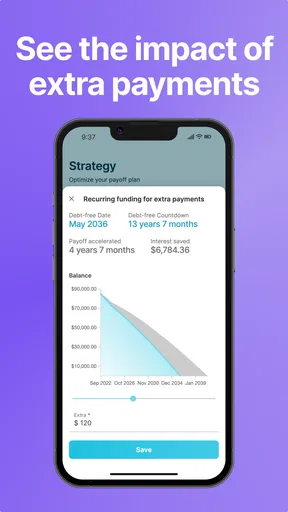
Another feature I found particularly handy was the ability to set up payment reminders. Let’s face it, life gets busy, and it’s easy to forget due dates. With this feature, the app sends you gentle nudges to ensure you’re on track. Plus, there’s a nifty option to add extra payments, which is fantastic if you come into some extra cash and want to make a dent in your debt.
For a familiar everyday example, imagine that a household receives a larger-than-usual paycheck one month. Rather than dividing the surplus impulsively, the person maintaining the plan can check the balances, decide whether an extra payment is genuinely affordable, and record it against the chosen debt. The reminder feature helps keep routine dates visible, while the extra-payment option gives a one-off contribution a place in the plan. The important step is to update the figures afterward so the next decision starts from the new balance.
There is a limit to what that workflow can do: a reminder can prompt action, but it cannot make an unaffordable payment sensible or settle a disagreement about household priorities. I’d first protect essential bills and then decide together what counts as spare money. If the debts have changing rates or unusual terms, review the account statements rather than assuming an old entry still describes the current situation.
The Benefits of Tracking Progress
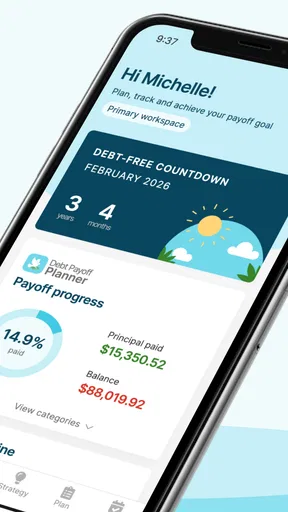
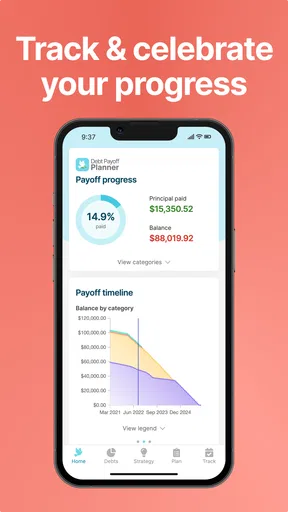
One of the standout aspects of this app is its focus on progress tracking. As you make payments, the app updates your debt totals and provides a visual representation of your progress. Seeing that bar inch closer to zero is incredibly satisfying and motivating. It’s like having a personal cheerleader in your pocket!
That visual can be useful for keeping a long effort from feeling abstract, but I would read it as motivation rather than a guarantee. The progress view is only as dependable as the entries behind it, and real balances can be affected by ongoing interest or changes in payment timing. A quick check against a current statement before a major planning decision helps keep the picture grounded.
Not to mention, the app provides insightful reports and statistics. These reports show you how much interest you’ve saved and how much time you’ve shaved off your debt journey. It’s a great way to see the fruits of your labor and feel a sense of accomplishment.
For a household, reports can make a useful check-in less focused on blame and more focused on decisions: what has changed, which target is next, and whether the agreed amount still fits the month. I’d keep those conversations brief and practical. A report is a snapshot of the plan, not a measure of anyone’s character or effort.
Final Thoughts
All in all, the Debt Payoff Planner & Tracker is a fantastic tool for anyone looking to get serious about managing and eliminating debt. Its user-friendly design, variety of payoff strategies, and focus on progress tracking make it a valuable ally in the fight against debt.
I think it is especially well suited to someone who wants a clearer payoff order, responds to visible milestones, and is willing to keep balances and payments up to date. It can also suit a couple who already communicate about money and want a shared planning conversation. I would skip it if what you really need is automatic transaction categorization, comprehensive spending analysis, or firm multi-user controls; a budgeting app or a more formal household finance system would serve those jobs better.
Of the usual alternatives, a spreadsheet offers flexibility and can be customized around a household’s exact responsibilities, but it takes more manual work to maintain and may not provide the same guided payoff comparisons. A paper list is private and simple, yet it is harder to use for scenario checks. This app sits between those options: more purpose-built than a list, but still dependent on people entering and reviewing their own numbers.
Of course, no app is perfect, and while this one does a great job, it’s essential to remember that it should be part of a broader financial plan. It’s a guide and a motivator, but ultimately, the hard work is up to you. If you’re committed to your financial goals, this app can definitely help you get there.
My final household test would be simple: can the people involved agree on what the plan includes, who keeps it current, and how they will confirm payments? If yes, the planner can give those conversations structure without taking over the decisions. If not, sort out those boundaries first, or choose a tool designed for the kind of shared oversight you need.
So, if you’re ready to tackle your debt with a clear plan and a bit of digital support, give the Debt Payoff Planner & Tracker a try. You might just find it’s the key to unlocking a future free of financial stress.
Pros
- User-friendly interface for easy navigation.
- Customizable payment plans to fit budgets.
- Visual progress tracking boosts motivation.
- Reminders to keep you on track with payments.
- Secure data handling ensures privacy.
Cons
- Limited features in the free version.
- No direct bank integration for payments.
- Ads can be distracting for free users.
- Lacks multi-currency support.
- No option for joint account tracking.
FAQs for Debt Payoff Planner & Tracker
What features does Debt Payoff Planner & Tracker offer?
Debt Payoff Planner & Tracker provides a comprehensive suite of features, including the ability to input multiple debts, customize payoff strategies like the snowball method, and track progress over time. Users can also set reminders, visualize their payoff timeline, and adjust plans as their financial situation changes.
Is Debt Payoff Planner & Tracker user-friendly for beginners?
Yes, the app is designed with simplicity in mind, making it easy for beginners to navigate. It features a clean interface with step-by-step guides and tutorials to help users set up their debt repayment plans without needing extensive financial knowledge.
Can I sync Debt Payoff Planner & Tracker with other financial apps?
Currently, Debt Payoff Planner & Tracker does not offer direct syncing with other financial apps. However, users can manually import data to ensure their debt repayment plan aligns with their overall financial goals. Future updates may include integration options based on user feedback.
Is the app secure for managing sensitive financial information?
Yes, Debt Payoff Planner & Tracker employs robust security measures to protect user data. It uses encryption to safeguard personal and financial information, ensuring that your data remains confidential and secure from unauthorized access.
Does Debt Payoff Planner & Tracker offer customer support?
The app provides dedicated customer support to assist users with any issues or questions. Support is available via email and an in-app help section, offering timely and helpful responses to ensure a smooth user experience. Users can also access a comprehensive FAQ and troubleshooting guide.


